
Description : Zebronics A122 Full HD LED Monitor
Zebronics A122 Full HD LED Monitor, 21.5″ Anti-Glare Screen offers a clear Full HD viewing experience with a comfortable anti-glare panel, making it suitable for work, study, browsing, entertainment and everyday computing. Explore its display quality, design, connectivity and overall usability in this detailed review.
Key Highlights
- 21.5-inch Full HD LED display
- Anti-glare screen for comfortable viewing
- Sharp 1920 × 1080 resolution
- Suitable for work, study and entertainment
- Slim and modern monitor design
Zebronics A122 Full HD LED Monitor Review
The Zebronics A122 Full HD LED Monitor, 21.5″ Anti-Glare Screen is designed for users who want a practical desktop monitor that can comfortably handle work, study, browsing, entertainment and everyday computing without taking up too much desk space. With a 21.5-inch Full HD display, 100Hz refresh rate, anti-glare screen, slim bezel-less design and HDMI and VGA connectivity, the monitor focuses on the features that are useful for a modern home or office setup. Its combination of compact size and Full HD resolution makes it suitable for users who want more screen space than a laptop while still keeping their workstation relatively compact.
The first thing that stands out is the 21.5-inch screen. The 54.6cm display offers a comfortable amount of viewing space without making the monitor feel oversized on a smaller desk. For office work, spreadsheets, web browsing, online classes and document editing, the screen provides enough room to keep content visible without constantly switching between windows. The 16:9 aspect ratio is also well suited to modern video content, presentations and general desktop applications. The Full HD 1920 × 1080 resolution keeps text and images reasonably sharp for this screen size, making it a practical resolution for everyday computing.
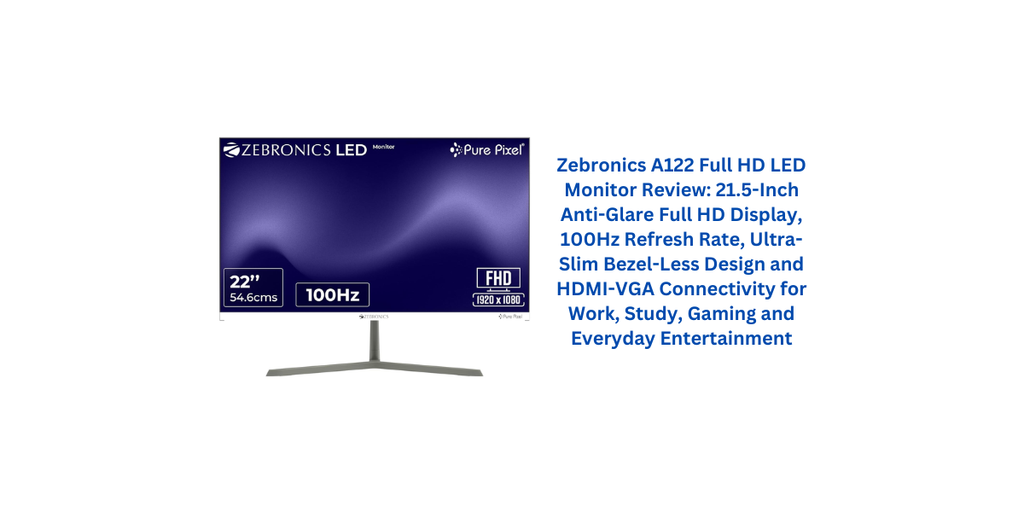
The anti-glare coating is another useful feature, particularly for people who spend several hours in front of a monitor. Reflections from windows, room lights and other bright sources can sometimes make a glossy screen uncomfortable to use, especially during long work or study sessions. The anti-glare surface of the A122 is intended to reduce those reflections and make the screen easier to view in normal indoor environments. It does not eliminate every possible reflection, but it is a useful addition for a monitor intended for regular daily use.
The 100Hz refresh rate is one of the most noticeable upgrades compared with traditional 60Hz office monitors. A higher refresh rate allows the display to update more frequently, which can make cursor movement, scrolling through websites and moving windows around the desktop feel smoother. This does not turn the monitor into a high-end gaming display, but it does provide a more fluid everyday experience. For users who spend a lot of time browsing websites, scrolling through documents or watching videos, the difference can be noticeable compared with a basic 60Hz monitor.
For casual gaming, the 100Hz refresh rate can also be useful. It provides a smoother presentation than a standard 60Hz screen, particularly in games where movement is relatively quick. The monitor is not positioned as a specialist competitive gaming display, however, so buyers should keep expectations realistic. The A122 is better understood as a versatile everyday monitor that can also handle casual gaming rather than a dedicated gaming monitor with an extensive set of gaming-focused features.
The display is specified with a maximum brightness of 250 nits, which is a reasonable level for normal indoor environments. It should work well in typical bedrooms, study rooms, offices and other indoor spaces where lighting is controlled. In very bright rooms or areas where direct sunlight falls onto the screen, 250 nits may feel less powerful than brighter premium displays. This is therefore a monitor that makes the most sense in conventional indoor working environments rather than extremely bright locations.
The monitor also offers a 16.7-million-colour display and a listed 98% sRGB colour-space figure. This gives it a useful foundation for everyday images, videos and general visual work. For normal productivity and entertainment, the colour output should be more than adequate. However, professionals who require highly precise colour calibration for photography, professional video production or colour-critical design should look beyond basic specifications such as colour gamut and consider a monitor specifically designed for calibrated professional work.
Response time is listed at 4ms, which complements the 100Hz refresh rate by helping the display respond quickly to changes in the image. For everyday desktop work, this is more than sufficient. During casual gaming and video playback, the combination of a 4ms response time and 100Hz refresh rate should provide a reasonably smooth viewing experience. Actual motion performance can still vary depending on the panel characteristics and the content being displayed, so the specification should be viewed as an indicator rather than a guarantee of identical performance in every situation.
The design of the Zebronics A122 Full HD LED Monitor, 21.5″ Anti-Glare Screen is another area where the monitor aims to look more modern than a traditional office display. Zebronics describes it as an ultra-slim, bezel-less monitor. The narrow-bezel approach allows more of the front surface to be occupied by the screen and gives the monitor a cleaner appearance when placed on a desk. It can also be useful for people who plan to use two monitors side by side because narrower bezels can make the transition between screens feel less visually distracting.
Its compact dimensions make it suitable for smaller workstations. The manufacturer lists the monitor at approximately 49.1cm wide, with the overall height including the stand around 38.2cm. The net weight with the stand is around 2kg, so it should be relatively manageable when moving the monitor or rearranging a desk. This compact form factor can be particularly useful for students, home-office users and people working with limited desk space.
Connectivity is straightforward, with HDMI and VGA inputs. HDMI is the more modern option and can be used with many contemporary desktops, laptops and other compatible devices. VGA is useful when connecting older computers or systems that still rely on the legacy analogue video connection. Having both options gives the monitor greater flexibility, especially in homes and offices where different generations of computers may be used.
The inclusion of a 75 × 75mm wall-mounting pattern is another practical feature. Users who prefer a cleaner desk or want to position the monitor at a different height can use a compatible wall mount or monitor arm. This can be especially helpful in smaller workspaces where every bit of desk area matters. Wall mounting also provides more freedom when arranging keyboards, speakers, notebooks and other accessories around the workstation.
Power consumption is listed at a maximum of 20 watts, which is reasonable for a monitor of this size. For people who use their desktop setup for many hours each day, relatively modest power consumption can be a useful consideration. It also makes the monitor a practical choice for home and office environments where electricity usage matters.
The monitor’s Full HD resolution is particularly useful for productivity. Text in documents, spreadsheets and web pages should appear considerably more detailed than on older low-resolution displays. Having a dedicated 21.5-inch screen can also make long working sessions more comfortable than relying solely on a smaller laptop display. Users can position the monitor at a suitable distance and use the larger viewing area for documents, browser windows, presentations and other applications.
For students, the monitor can be useful for online classes, research, assignments and entertainment after study hours. The anti-glare screen and Full HD resolution make it appropriate for reading and viewing educational material, while the 100Hz refresh rate adds smoothness when navigating websites and applications. Its relatively compact footprint is also helpful in study areas where desk space may be limited.
For office users, the A122 has a practical feature set. A 21.5-inch Full HD screen provides enough space for typical productivity software, email, web applications and spreadsheets, while HDMI and VGA connectivity make it easy to integrate with different computers. The 16:9 aspect ratio also works well with common business applications and video meetings. The monitor does not attempt to overload the user with unnecessary features, instead concentrating on basic display functionality.
Entertainment is another area where the monitor can perform well. Full HD resolution is suitable for streaming movies and videos at 1080p, while the 16:9 widescreen format matches the shape used by most modern video content. The 100Hz refresh rate can make scrolling and motion appear smoother, although the overall viewing experience will naturally depend on the source quality and the capabilities of the connected device.
There are some limitations worth keeping in mind. The 21.5-inch size is compact, but users who frequently work with large spreadsheets, multiple windows or complex creative applications may prefer a 24-inch or larger display. Similarly, the 250-nit brightness is suitable for normal indoor use but may not be ideal for extremely bright environments. The monitor’s feature set is also relatively focused, so users looking for premium gaming functions, advanced ergonomics or extensive connectivity may need a more specialised model.
Another consideration is the difference between having a 100Hz refresh rate and having a monitor specifically designed for competitive gaming. The A122’s 100Hz refresh rate is useful for smoother everyday motion and casual gaming, but buyers who require advanced gaming features should check for technologies such as adaptive sync, HDR and other specialised capabilities before choosing a monitor. The A122 is better suited to users who want a versatile display for work, study and entertainment with some gaming capability rather than a dedicated esports monitor.
Overall, the Zebronics A122 Full HD LED Monitor, 21.5″ Anti-Glare Screen presents a straightforward and practical package for everyday desktop use. Its 21.5-inch Full HD screen provides a useful amount of workspace, while the anti-glare surface makes it more comfortable for long periods of viewing. The 100Hz refresh rate adds smoothness to scrolling and motion, and the 4ms response time gives the display a responsive specification for normal use and casual gaming.
The ultra-slim bezel-less design also gives the monitor a modern appearance without requiring a large desk. HDMI and VGA connectivity make it compatible with both newer and older systems, while 75 × 75mm wall-mount support provides additional flexibility for different workstation arrangements. With 250-nit brightness, Full HD resolution and 16.7-million-colour support, the display is primarily aimed at comfortable everyday computing rather than professional colour-critical work.
In the end, this monitor makes the most sense for users who want a compact Full HD display for office work, studying, browsing, online classes, entertainment and casual gaming. It offers a useful combination of a 21.5-inch screen, anti-glare coating, 100Hz refresh rate, slim bezel-less design and flexible connectivity. Rather than trying to be a premium all-purpose monitor, the A122 focuses on providing the essential features needed for a modern desktop setup in a compact form factor.
5 Positive Things About Zebronics A122 Full HD LED Monitor, 21.5″ Anti-Glare Screen
1. Full HD Resolution
The Zebronics A122 Full HD LED Monitor, 21.5″ Anti-Glare Screen offers a 1920 × 1080 Full HD resolution, providing clear and detailed visuals for office work, study, browsing and entertainment.
2. Smooth 100Hz Refresh Rate
The 100Hz refresh rate makes scrolling, window movement and everyday screen navigation smoother than a standard 60Hz monitor.
3. Anti-Glare Screen
The anti-glare panel helps reduce distracting reflections from indoor lights and windows, making the monitor more comfortable for extended use.
4. HDMI and VGA Connectivity
Having both HDMI and VGA inputs makes the monitor compatible with a wide range of modern and older computers and laptops.
5. Slim Bezel-Less Design
The slim bezel-less design gives the monitor a clean, modern appearance while making it suitable for compact desks and multi-monitor setups.
5 Negative Things About Zebronics A122 Full HD LED Monitor, 21.5″ Anti-Glare Screen
1. 21.5-Inch Size May Feel Small for Some Users
Users who regularly work with large spreadsheets, multiple windows or professional editing software may prefer a larger 24-inch or 27-inch monitor.
2. 250-Nit Brightness
The 250-nit brightness is suitable for normal indoor environments, but the screen may not be ideal for very bright rooms or direct sunlight.
3. No Premium Gaming Features
Although the 100Hz refresh rate is useful for casual gaming, users looking for advanced gaming features may find the monitor’s feature set limited.
4. Full HD Rather Than Higher Resolution
The 1920 × 1080 resolution is suitable for everyday use, but users wanting a sharper 1440p or 4K experience will need a higher-resolution monitor.
5. Basic Connectivity Selection
HDMI and VGA cover common requirements, but users who need DisplayPort, USB ports or USB-C connectivity may find the available connections limited.
Specification : Zebronics A122 Full HD LED Monitor, 21.5″ Anti-Glare Screen
| Specification | Details |
|---|---|
| Product Name | Zebronics A122 Full HD LED Monitor |
| Screen Size | 21.5 Inches |
| Display Type | LED |
| Display Technology | LED |
| Aspect Ratio | 16:9 |
| Resolution | Full HD 1080p |
| Native Resolution | 1920 × 1080 Pixels |
| Maximum Display Resolution | 1920 × 1080 Pixels |
| Refresh Rate | 100Hz |
| Response Time | 4ms |
| Contrast Ratio | 4000:1 |
| Brightness | 250 cd/m² |
| Viewing Angle | 178 Degrees |
| Screen Finish | Anti-Glare |
| Color Screen | Yes |
| Color Technology | Wide Color Gamut |
| Display Enhancement | Anti-Glare Display |
| Design | Ultra-Slim Bezel-Less |
| Colour | Black |
| HDMI Ports | 2 |
| Connectivity | HDMI, VGA |
| Hardware Connectivity | HDMI, VGA |
| Power Consumption | 20 Watts |
| Dimensions (D × W × H) | 0.7 × 49.1 × 38.2 cm |
| Item Weight | 2 kg |
| Specific Use | Gaming |
| Warranty | 1 Year Manufacturer Warranty |
5 random customer testimonial from india with rating.
1. ⭐⭐⭐⭐⭐ (5/5)
“I bought the Zebronics A122 mainly for office work and browsing, and I am quite happy with the overall display. The Full HD resolution looks sharp, while the 100Hz refresh rate makes scrolling and regular usage feel smoother. The slim bezel-less design also gives my desk a clean look.”
2. ⭐⭐⭐⭐ (4/5)
“The screen quality of the Zebronics A122 is good for everyday work, online classes and watching videos. The anti-glare finish is useful when there is some light around the desk. I also like having both HDMI and VGA connectivity. The brightness could be higher, but overall it works well for my requirements.”
3. ⭐⭐⭐⭐⭐ (5/5)
“I was looking for an affordable Full HD monitor for my PC setup and selected the Zebronics A122. The 100Hz refresh rate is a noticeable improvement over basic 60Hz monitors, especially while browsing and moving around the desktop. The monitor is lightweight and does not take much space.”
4. ⭐⭐⭐⭐ (4/5)
“The Zebronics A122 has a simple and modern design, and the picture quality is clear for regular usage. I mainly use it for work, YouTube and studying. The 21.5-inch size is suitable for my desk, although people who prefer larger screens may want something bigger.”
5. ⭐⭐⭐⭐ (4/5)
“Overall, the Zebronics A122 offers a good combination of Full HD resolution, 100Hz refresh rate and HDMI connectivity. Text looks clear and videos are enjoyable on the screen. I would have liked more connectivity options, but for basic work and entertainment, the monitor meets my expectations.”

