Description : Lenovo Idea Tab (Smartchoice) with Tab Pen
Discover the Lenovo Idea Tab ( Smartchoice) with Tab Pen | WiFi+5G |11″ 2.5K IPS Display |6GB RAM + 128GB ROM, designed for learning, entertainment, and everyday productivity. Explore its standout features and practical benefits.
- 11-Inch 2.5K IPS Display: Enjoy sharp visuals and a spacious viewing experience.
- 6GB RAM + 128GB ROM: Handle everyday tasks and store apps, files, and media.
- Wi-Fi + 5G Connectivity: Stay connected at home or on the go with a compatible 5G network.
- Tab Pen Included: Support handwritten notes, sketches, and other compatible pen-based tasks.
Lenovo Idea Tab (Smartchoice) with Tab Pen Review
Choosing a tablet for everyday use is not just about finding a large screen or enough storage. A good tablet should offer a comfortable viewing experience, reliable performance for routine activities, convenient connectivity, and features that make studying, working, and relaxing easier. The Lenovo Idea Tab ( Smartchoice) with Tab Pen | WiFi+5G |11″ 2.5K IPS Display |6GB RAM + 128GB ROM brings together several features that may appeal to students, professionals, and users who want a versatile device for their daily digital activities.
One of the most noticeable highlights of this Lenovo tablet is its 11-inch 2.5K IPS display. Screen quality plays an important role in the overall tablet experience, particularly when watching videos, reading digital books, attending online classes, or browsing websites for extended periods. The high-resolution display is designed to provide sharp visuals and clear text, making everyday content more enjoyable to view. The 11-inch screen also provides a comfortable amount of space for multitasking, viewing documents, and working with compatible applications. Whether the tablet is being used for entertainment after a busy day or for educational activities, the large display is a key part of its appeal.
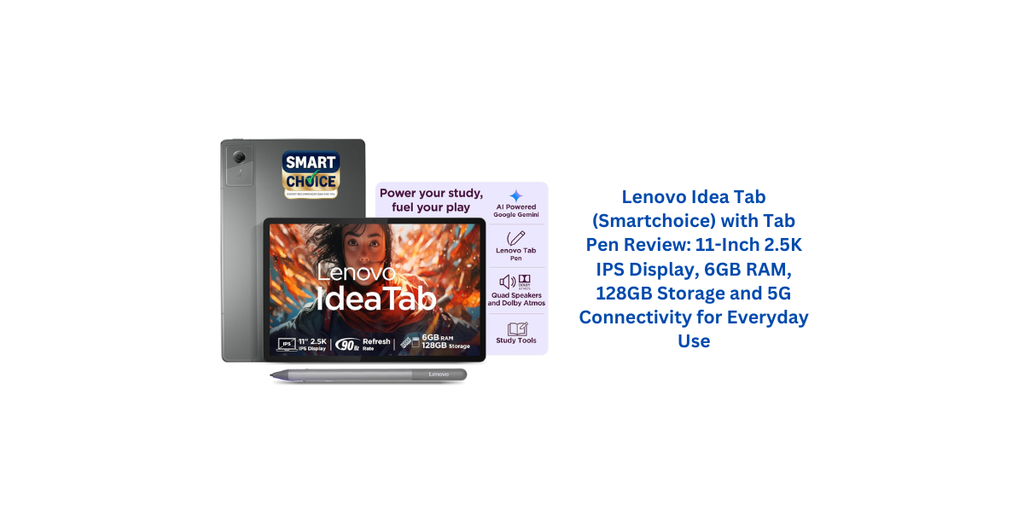
The included Tab Pen adds another useful dimension to the experience. For students, a compatible pen can make taking handwritten notes, marking important sections in documents, and organising study material more convenient. Professionals may find it helpful for making quick annotations, planning ideas, or sketching simple concepts. Creative users can also explore drawing and handwriting applications that support pen input. Having a pen included in the product package can be particularly appealing to people who prefer writing or interacting with content directly on the screen rather than relying entirely on a touchscreen keyboard. However, the available pen features and supported applications may vary, so users should check compatibility before expecting advanced drawing or note-taking functions.
Memory and storage are also important considerations when purchasing a tablet. The Lenovo Idea Tab comes with 6GB RAM and 128GB internal storage, a combination intended to support common activities such as browsing, reading, online learning, messaging, video streaming, and using everyday applications. The available RAM helps the device manage routine tasks, although actual performance will also depend on the processor, software optimisation, and the number of applications running simultaneously. The 128GB storage capacity offers room for applications, photographs, documents, downloaded videos, and study materials. Users who regularly save large files should still consider how much space their preferred applications and media are likely to require.
Connectivity is another important feature of this model. With Wi-Fi and 5G connectivity, the tablet is positioned for users who want more flexibility when accessing online services. Wi-Fi can be convenient at home, in educational institutions, and in workplaces, while 5G connectivity can provide mobile internet access in supported coverage areas. This may be useful for attending online meetings, downloading files, accessing cloud-based documents, and streaming content while travelling. However, 5G functionality requires a compatible network, an appropriate SIM or mobile service arrangement, and coverage in the area. Users should confirm the supported SIM configuration and network bands for the exact model before purchasing.
For entertainment, the combination of a spacious display and everyday tablet functionality makes this device worth considering. Watching films, viewing online videos, reading articles, and browsing social media can feel more comfortable on an 11-inch screen than on a smartphone. The larger viewing area is also useful when sharing content with another person or following instructions while performing a task. Students can keep digital textbooks open, while professionals may use the screen to review presentations or documents. Although the tablet offers a flexible entertainment experience, users who prioritise demanding games or professional creative applications should examine detailed performance information and application requirements before making a decision.
The tablet may also suit people who want one device for both learning and general productivity. The included pen can make handwritten notes and document annotations more natural, while the 6GB RAM and 128GB storage provide a practical foundation for everyday digital work. Reading, preparing assignments, managing files, joining online sessions, and reviewing documents are examples of tasks that can benefit from a dedicated tablet. Its usefulness will depend on the applications being used and whether those applications support the desired workflow. Anyone planning to replace a laptop entirely should also consider keyboard compatibility, office software requirements, file management, and the limitations of their preferred Android applications.
Software is another factor worth considering. The Android platform provides access to a broad range of applications for education, communication, productivity, and entertainment. Users can personalise their experience around their needs, from installing reading applications to using digital notebooks and video-conferencing tools. Before purchasing, it is sensible to check the exact Android version supplied with the tablet, the manufacturer’s software-update policy, and the availability of security updates. These details can affect how long the device remains suitable for everyday use.
Battery performance can significantly influence the convenience of a tablet, especially for students and people who frequently travel. Since detailed battery capacity and battery-life figures have not been confirmed for this particular configuration, it would be unwise to make firm claims about how long it will last on a single charge. Actual endurance generally depends on screen brightness, mobile network usage, streaming, gaming, and the number of applications running in the background. Buyers who expect to use the tablet throughout a full day of classes or travel should review verified battery specifications and independent testing where available.
It is equally important to consider the practical limitations of a tablet before making a purchase. Although the large display and included pen may be useful for many activities, the overall experience depends on the quality of the pen implementation, processor performance, software support, battery life, and the applications being used. People who need advanced video editing, intensive gaming, or specialised desktop software should compare their requirements with the device’s confirmed capabilities. Similarly, users who depend on mobile internet should verify 5G compatibility with their network provider rather than relying only on the product title.
Overall, the Lenovo Idea Tab (Smartchoice) with Tab Pen is an appealing option to explore for users looking for a tablet with a large, high-resolution display, useful memory and storage, pen-based interaction, and Wi-Fi plus 5G connectivity. Its combination of features could make it suitable for online learning, handwritten notes, document reading, everyday productivity, and entertainment. The included Tab Pen is especially relevant for people who prefer writing or annotating directly on the screen. Before making a final decision, buyers should compare the price with competing tablets and confirm the processor details, battery specifications, software-update support, pen compatibility, and exact 5G configuration. For users whose priorities match its confirmed capabilities, this Lenovo tablet could be a practical addition to everyday digital life.
5 Positive Things About Lenovo Idea Tab (Smartchoice) with Tab Pen
- Sharp 2.5K IPS Display: The Lenovo Idea Tab (Smartchoice) with Tab Pen features an 11-inch 2.5K IPS display that offers a spacious viewing area for online classes, reading, browsing, and watching videos.
- Useful Tab Pen Support: The included Tab Pen can make handwritten notes, document annotations, and compatible drawing activities more convenient for students and professionals.
- 6GB RAM for Everyday Tasks: The 6GB RAM configuration is suitable for routine activities such as browsing, online learning, messaging, and using everyday applications, depending on software optimisation and workload.
- 128GB Internal Storage: The 128GB storage capacity provides space for applications, documents, photographs, downloaded content, and study materials.
- Wi-Fi and 5G Connectivity: The Lenovo Idea Tab (Smartchoice) with Tab Pen supports Wi-Fi and 5G connectivity, offering flexibility for internet access when connected to a compatible network and service.
5 Negative Things About Lenovo Idea Tab (Smartchoice) with Tab Pen
- 5G Compatibility Needs Checking: Actual 5G connectivity depends on network coverage, supported bands, and the correct SIM or mobile service configuration. Buyers should verify compatibility before purchasing.
- Gaming Performance May Vary: Users interested in demanding games should check detailed processor specifications and performance tests to determine whether the tablet meets their expectations.
- Battery Life Needs Verification: Without confirmed battery capacity and tested endurance figures for this exact variant, it is difficult to judge how well the Lenovo Idea Tab (Smartchoice) with Tab Pen will perform during extended use.
- Pen Features May Be Limited by Compatibility: The available writing, drawing, and pressure-sensitivity features depend on the included pen and supported applications. Users should verify these details if advanced note-taking or creative work is important.
- Software Update Support Should Be Confirmed: Buyers should check the manufacturer’s update policy and security-support period to understand how long the tablet is expected to receive software updates.
Lenovo Idea Tab (Smartchoice) with Tab Pen 5G – Specifications
| Specification | Details |
|---|---|
| Brand | Lenovo |
| Model | Idea Tab (Smartchoice) |
| Device Type | Tablet |
| Operating System | Android 15 |
| Display Size | 11 Inches |
| Display Type | LCD |
| Display Resolution | 2560 × 1600 Pixels (2.5K) |
| Aspect Ratio | 16:10 |
| Maximum Brightness | 500 Nits |
| Refresh Rate | 90Hz |
| Processor | MediaTek Dimensity 6300 |
| Processor Speed | Up to 2.4GHz |
| Graphics | Integrated Graphics |
| RAM | 6GB |
| Internal Storage | 128GB |
| Expandable Storage | Yes, microSD supported |
| Rear Camera | 8MP |
| Front Camera | 5MP |
| Rear Camera Setup | Single Camera |
| Audio System | Four Speakers |
| Audio Technology | Dolby Atmos Optimisation, as specified |
| Connectivity | Wi-Fi, Bluetooth and Cellular |
| Cellular Network | 5G |
| Wi-Fi Standard | 802.11ac |
| USB Interface | USB Type-C |
| Total USB Ports | 1 |
| Stylus Support | Touchscreen with stylus support |
| Included Accessory | Tab Pen, as indicated in the product title |
| Battery Capacity | 7040mAh |
| Battery Type | Lithium-Ion |
| Claimed Battery Life | Up to 9 Hours, as specified |
| Special Features | Fast Charging, Expandable Storage, Cellular Connectivity, Stereo Speakers and Stylus Support |
| Item Weight | 480g |
| Dimensions (L × W × Thickness) | 25.4 × 16.6 × 0.7cm |
| Warranty | Limited Warranty |
| Software Update Support | Not specified |
5 random customer testimonial from india with rating.
Rating: ★★★★★ (5/5)
“The 11-inch 2.5K display is a major highlight for me. Watching videos, reading study material, and browsing feels comfortable on the large screen. The Tab Pen is also useful for making notes and writing down important points.”
Rating: ★★★★☆ (4/5)
“I like the combination of 6GB RAM and 128GB storage because it provides space for my everyday applications and documents. The 5G connectivity is a useful feature when Wi-Fi is unavailable, provided the network is supported. I would like to know more about long-term software updates.”
Rating: ★★★★☆ (4/5)
“The Lenovo Idea Tab looks suitable for online classes, video streaming, and regular browsing. The 90Hz display and four-speaker setup are attractive features on paper. I would check gaming performance and battery endurance before using it for demanding tasks.”
Rating: ★★★★★ (5/5)
“The Tab Pen support makes this tablet interesting for students and people who prefer handwritten notes. The 11-inch display gives enough space to read documents and work with compatible applications. The combination of Wi-Fi and 5G also offers useful connectivity flexibility.”
Rating: ★★★★☆ (4/5)
“The MediaTek Dimensity 6300 processor, 6GB RAM, and 128GB storage make the listed configuration worth considering for everyday activities. I also appreciate the expandable storage option and USB Type-C port. Before buying, I would confirm the pen features and charging specifications.”