
Description : Acer Flow Wireless Mouse
Acer Flow Wireless Mouse is designed for smooth, quiet and comfortable everyday computing with a sleek wireless design. Explore its connectivity, comfort, performance, battery convenience and overall usability in this detailed review.
Key Highlights
- Sleek and lightweight design for comfortable everyday use
- Wireless connectivity for a cleaner and clutter-free workspace
- Smooth cursor control for browsing, office work and study
- Comfortable design suitable for extended usage
- Convenient rechargeable battery with Type-C charging
Acer Flow Wireless Mouse : Review
A good wireless mouse can make everyday computer use noticeably more comfortable, especially when a laptop or desktop is used for several hours a day. The Acer Flow Wireless Mouse is designed around this simple idea, combining a clean and compact design with wireless flexibility, adjustable sensitivity, quiet clicking and a rechargeable battery. Instead of relying on a traditional disposable battery setup, this model comes with a built-in 500mAh rechargeable battery and Type-C charging, which makes it convenient for regular use at home, in the office or while travelling. Acer lists support for both Bluetooth and 2.4GHz wireless connectivity, giving users more flexibility when connecting it to compatible devices.
One of the first things that stands out about the mouse is its simple and practical appearance. The body has a symmetrical design, so it can comfortably suit both left-handed and right-handed users. Its compact dimensions of approximately 100 × 60 × 38 mm and weight of around 61 grams make it relatively easy to carry with a laptop or keep inside a small work bag. This lightweight construction can be particularly useful for students, office users and people who frequently move between different workspaces.
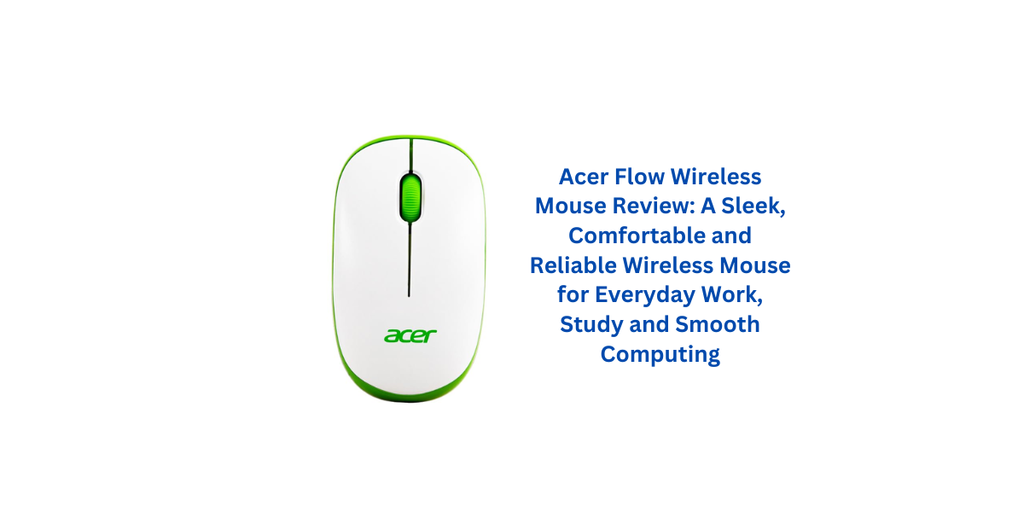
The wireless connectivity is one of the strongest practical aspects of the Acer Flow Wireless Mouse. It supports two connection methods, Bluetooth and 2.4GHz wireless. The 2.4GHz option works through the included USB receiver, while Bluetooth allows compatible devices to connect without occupying a traditional USB port. A dedicated mode key allows users to switch between the available wireless modes, which adds flexibility when the mouse is being used with different computers or devices. The stated wireless working range is up to 10 metres, although actual range can vary depending on the environment and interference.
For everyday computing, adjustable sensitivity is another useful feature. The mouse offers three DPI settings of 800, 1200 and 1600. This allows the pointer response to be adjusted according to the task. A lower setting can feel more controlled when performing detailed cursor movements, while a higher setting can make navigation across a larger display quicker. For normal browsing, document work, spreadsheets, office applications and general navigation, having multiple sensitivity levels gives users a little more control instead of being restricted to a single fixed setting.
Clicking noise is another area where this model focuses on everyday comfort. Acer describes the left and right buttons as 4D silent keys, designed to provide a quieter clicking experience. This can be useful in environments where loud mouse clicks become distracting, such as offices, libraries, study rooms or shared workspaces. The quieter operation does not change the basic purpose of the mouse, but it can make long periods of computer use feel less disruptive, particularly for people who prefer a more silent workspace.
The shape is also aimed at comfortable everyday use rather than a highly specialised gaming-oriented design. Because the body is symmetrical, both left-handed and right-handed users can use it without needing a specifically shaped version. The compact size gives it a relatively straightforward feel in the hand, while the lightweight construction helps make it easier to move around the desk. For office work, online classes, browsing, writing, spreadsheet management and general laptop use, the overall design is focused on practicality rather than unnecessary complexity.
Battery convenience is another major advantage. The mouse includes a 500mAh rechargeable battery, and Acer states that it can provide approximately one month of usage depending on usage conditions. The manufacturer also specifies a charging time of approximately three hours. Since the battery is rechargeable, there is no regular need to purchase and replace disposable batteries. Type-C charging is especially convenient because the same type of cable is widely used with many modern electronic devices.
For someone who spends a lot of time working on a laptop, this rechargeable approach can make the mouse easier to maintain. Instead of discovering that a disposable battery has run out and needing a replacement immediately, the mouse can simply be connected for charging. Battery performance will naturally depend on usage patterns, connection mode and other conditions, so the manufacturer’s approximate one-month figure should be viewed as a stated usage estimate rather than a guaranteed duration for every user.
The Acer Flow Wireless Mouse also makes sense for people who switch between different types of devices. Bluetooth connectivity can be useful with compatible laptops and other devices where keeping USB ports free is important, while the 2.4GHz receiver provides a familiar wireless connection method for compatible computers. Acer lists compatibility with PC, laptop, MacBook and iPad, although compatibility can vary depending on the operating system and device configuration.
In day-to-day use, the combination of lightweight construction, adjustable DPI and wireless connectivity gives the mouse a balanced purpose. It is not trying to be an aggressively designed gaming mouse with a large number of programmable controls. Instead, it is aimed at users who want a straightforward wireless pointing device that can handle normal computing tasks without adding cables to the desk. That makes its overall character more suitable for productivity, study, home computing and casual everyday use.
The quiet-click design can also be appreciated during long working sessions. When a mouse is used continuously for several hours, small details such as clicking sound, hand position and pointer responsiveness can have an impact on the overall experience. The quieter buttons help reduce repetitive clicking noise, while the adjustable sensitivity allows users to find a cursor speed that feels comfortable. The symmetrical body further improves flexibility for households or workplaces where different people may use the same mouse.
Portability is another area where this model performs well on paper. At around 61 grams, it is light enough to carry with a laptop without adding much weight to a travel bag. The compact dimensions also make it easier to store when not in use. For students moving between classrooms, professionals travelling between home and office, or anyone who regularly works from cafés and other locations, a small wireless mouse can be considerably more convenient than carrying a wired model.
The overall appearance is understated, which can work well with different desk setups. Rather than using an overly aggressive gaming aesthetic, the mouse has a simple form that fits naturally beside a laptop, desktop monitor or office keyboard. This makes it suitable for professional environments as well as home setups. The black version in particular has a neutral appearance that should pair easily with most computer accessories.
One useful detail is the claimed durability of the mouse buttons. Acer states that the keys are rated for up to three million operations. This does not mean every individual unit will necessarily reach exactly that figure, because real-world durability can depend on usage and environmental conditions, but it does provide an indication that the mouse has been designed for repeated everyday clicking.
There are, however, a few things potential buyers should keep in mind. The 1600 DPI maximum is perfectly reasonable for general computing, browsing and office work, but users looking for advanced gaming-oriented sensitivity options may prefer a mouse with a wider DPI range and more specialised controls. Similarly, the compact symmetrical design prioritises versatility, so users who prefer a large ergonomic mouse with pronounced palm support may find the shape different from what they normally use.
Another consideration is that wireless convenience depends on keeping the mouse charged. Although the rechargeable battery removes the need for disposable batteries, it still means the mouse needs to be connected to a charger periodically. The approximately three-hour charging time stated by Acer is manageable, but users who prefer products that can operate for very long periods on replaceable batteries may have different preferences.
Overall, the Acer Flow Wireless Mouse is designed as a practical everyday accessory rather than an overly complicated peripheral. Its combination of Bluetooth and 2.4GHz connectivity, three DPI levels, quiet buttons, symmetrical design, lightweight body and rechargeable battery gives it a useful mix of features for regular computer users. The Type-C charging system adds another layer of convenience, while the claimed wireless range of up to 10 metres provides enough flexibility for typical desk and room-based usage.
For office professionals, students, home users and laptop owners who want to reduce cable clutter, this mouse offers a straightforward approach. It focuses on the features that matter during everyday computer use without loading the design with unnecessary controls. The lightweight body makes it easy to carry, the dual wireless modes provide connection flexibility, and the quiet buttons can be helpful in shared environments.
The final impression is that Acer has positioned this model around convenience and everyday usability. It is particularly interesting for users who want a rechargeable wireless mouse that can work through both Bluetooth and a 2.4GHz receiver. While it may not be aimed at people searching for an advanced gaming mouse or highly customised professional peripheral, its practical feature set makes it a sensible option for general computing. For browsing, office applications, study, online work and everyday laptop use, the Acer Flow Wireless Mouse provides a clean combination of portability, wireless freedom and comfortable operation.
5 Positive Things About Acer Flow Wireless Mouse
- Dual Wireless Connectivity: The Acer Flow Wireless Mouse supports both Bluetooth and 2.4GHz wireless connectivity, offering flexibility across compatible devices.
- Rechargeable 500mAh Battery: Its built-in rechargeable battery eliminates the need for frequently replacing disposable batteries and supports convenient Type-C charging.
- Quiet Clicking Experience: The silent keys help reduce clicking noise, making the mouse suitable for offices, study areas and shared workspaces.
- Adjustable DPI Settings: With 800, 1200 and 1600 DPI options, the Acer Flow Wireless Mouse provides flexibility for browsing, office work and everyday navigation.
- Lightweight and Ambidextrous Design: The compact, approximately 61g body and symmetrical design make it convenient to carry and suitable for both left- and right-handed users.
5 Negative Things About Acer Flow Wireless Mouse
- Limited DPI Range: The maximum 1600 DPI may not be enough for users looking for advanced sensitivity options, particularly for specialised gaming requirements.
- Charging Required: Since the Acer Flow Wireless Mouse uses a built-in rechargeable battery, it needs to be charged periodically instead of simply replacing batteries.
- Basic Feature Set: Users looking for programmable buttons, RGB lighting or advanced customisation may find its feature set relatively simple.
- Compact Body May Not Suit Everyone: People who prefer a larger ergonomic mouse with extensive palm support may need some adjustment to its compact design.
- Not Primarily Designed for Gaming: The Acer Flow Wireless Mouse is focused more on everyday computing, office work and portability than advanced gaming performance.
Acer Flow Wireless Mouse : Specifications
| Specification | Details |
|---|---|
| Product Type | Wireless Optical Mouse |
| Connectivity | 2.4 GHz Wireless via USB Nano Receiver |
| Connection Interface | USB |
| Movement Detection Technology | Optical Sensor |
| Maximum Sensitivity | 1600 DPI |
| Number of Buttons | 3 |
| Hand Orientation | Ambidextrous |
| Wireless Working Range | Up to 10 Metres |
| Product Features | Ergonomic Design, Lightweight, Portable, Soundless, Wireless |
| Compatible Devices | Laptop, Personal Computer |
| Operating System | Windows 7 |
| Minimum OS Compatibility | macOS 10.12 Sierra, Windows 7 |
| Power Source | Battery Powered |
| Battery Type | 1 × AA Battery |
| Battery Included | Yes |
| Colour | White/Green |
| Style | Modern |
| Enclosure Material | Plastic |
| Dimensions | 11 × 6.2 cm |
| Weight | 120 g |
| Unit Count | 1 Mouse |
| Hardware Platform | Laptop, PC |
5 random customer testimonial from india with rating.
⭐⭐⭐⭐⭐
“I have been using the Acer Flow Wireless Mouse for everyday laptop work and really like how quiet the clicks are. The mouse feels lightweight, moves smoothly and the wireless connection has been convenient for my regular office work.”
⭐⭐⭐⭐☆
“The compact design and comfortable shape make the Acer Flow Wireless Mouse easy to use for long working sessions. The white and green colour combination also looks stylish on my desk. Overall, it has been a good choice for normal browsing and office work.”
⭐⭐⭐⭐⭐
“I wanted a simple wireless mouse without spending too much, and this model fits my requirements well. The Acer Flow Wireless Mouse feels responsive, the 1600 DPI sensitivity is enough for my daily use, and the silent clicking is a nice feature.”
⭐⭐⭐⭐☆
“What I like most about the Acer Flow Wireless Mouse is its lightweight and ambidextrous design. It is easy to carry with my laptop and works well for documents, browsing and online classes. The overall build feels basic but practical.”
⭐⭐⭐⭐☆
“The Acer Flow Wireless Mouse offers a smooth everyday experience and the wireless setup is very convenient. I especially like the quiet buttons because I often work in a shared room. It is a straightforward mouse for regular computer use.”

