
Description : LG24U411A-BN Smartchoice 24-Inch Full HD IPS Monitor
Explore the LG24U411A-BN Smartchoice 60 cm (24-inch) Full HD (1920 x 1080) IPS Monitor, 3-Side Virtually Borderless with sharp Full HD visuals, an IPS panel, slim border design, and a practical screen size for work, study, entertainment, and everyday computing.
Key Highlights
- 24-Inch Full HD Display: The 1920 × 1080 resolution provides detailed and clear visuals for everyday tasks.
- IPS Panel: Designed to offer consistent colours and wide viewing angles.
- 3-Side Virtually Borderless Design: Slim bezels provide a modern appearance and a more immersive viewing experience.
- 60 cm Screen Size: Offers a practical balance between desktop space and comfortable viewing.
- Suitable for Work: Useful for documents, spreadsheets, browsing, emails, and office applications.
- Good for Study: The Full HD screen provides a comfortable workspace for online classes, research, and reading.
LG24U411A-BN Smartchoice 24-Inch Full HD IPS Monitor – Full Review
A good monitor can make a surprisingly big difference to everyday computer use. Whether you spend hours working on documents, attending online classes, browsing the web, watching videos, or simply using a desktop computer, having a comfortable and clear display can make everything feel easier.
The LG24U411A-BN Smartchoice 60 cm (24-inch) Full HD (1920 x 1080) IPS Monitor, 3-Side Virtually Borderless is designed as an everyday monitor that combines a practical 24-inch screen size with Full HD resolution, IPS display technology, and a modern virtually borderless design.
Rather than being aimed only at a particular type of user, this monitor is positioned as a versatile option for home, office, study, and entertainment setups.
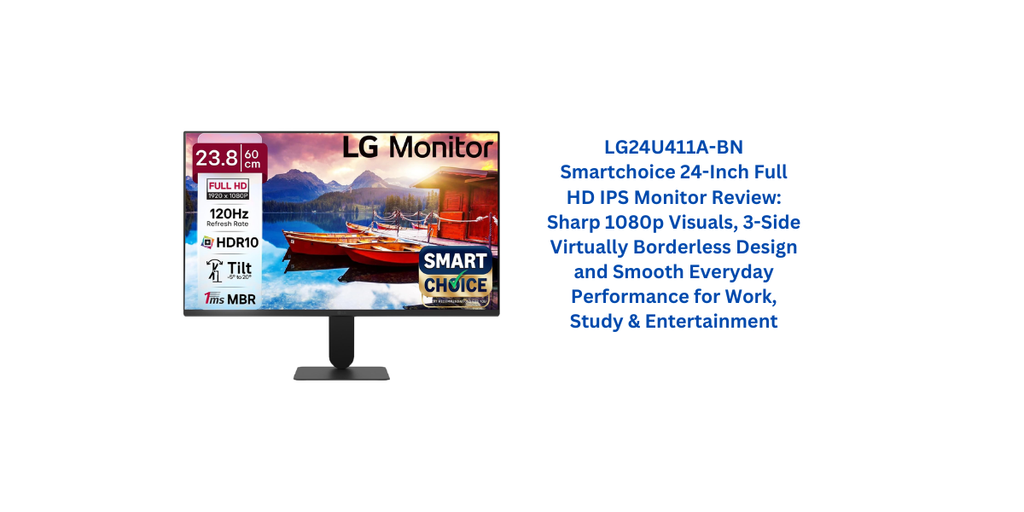
24-Inch Screen Size: A Practical Sweet Spot
The 24-inch display size is one of the most appealing aspects of this monitor.
A screen this size provides enough space to comfortably work with documents, websites, spreadsheets, and other applications without taking up an excessive amount of desk space.
For users upgrading from a smaller laptop screen or an older monitor, the additional screen area can make multitasking feel much more comfortable.
At the same time, a 24-inch monitor is not so large that it becomes difficult to fit on a typical desk.
This makes it a sensible choice for students, office workers, home users, and anyone building a relatively compact desktop setup.
Full HD 1920 × 1080 Resolution
The monitor features a Full HD resolution of 1920 × 1080 pixels.
For a 24-inch display, Full HD provides a practical balance between image clarity and everyday performance.
Text can appear sufficiently detailed for documents, emails, web browsing, and office applications, while photos and videos can benefit from the additional screen space compared with smaller displays.
For everyday entertainment, Full HD is also more than adequate for watching common online video content.
It is worth remembering that the quality of the final image also depends on the source content. A high-resolution monitor cannot make low-quality source material look like native Full HD content.
IPS Panel for Everyday Viewing
The use of an IPS panel is another important feature.
IPS technology is widely appreciated for its wide viewing angles and generally consistent colour presentation. This means the image can remain easier to view when you are not sitting perfectly in front of the monitor.
That can be useful when more than one person is looking at the screen or when you occasionally move around while working.
For office work, study, browsing, and entertainment, the IPS panel makes the monitor versatile.
It is not necessarily aimed at professional colour-critical work, but for everyday computing and multimedia use, an IPS display can provide a pleasant viewing experience.
3-Side Virtually Borderless Design
The 3-side virtually borderless design gives the monitor a cleaner and more contemporary appearance.
Slim bezels can make a display look more modern, but they also have a practical advantage. When the visible borders are reduced, the screen can feel more expansive without physically increasing its size.
This can be particularly useful in a multi-monitor setup.
If two monitors are placed side by side, thinner borders can make the transition between screens feel less visually distracting.
Even when used as a single display, the design contributes to a clean-looking desk setup.
Good for Office Work
For professionals and home-office users, a monitor needs to make everyday productivity comfortable.
The 24-inch Full HD display provides enough workspace for common tasks such as:
- Writing documents
- Creating spreadsheets
- Managing emails
- Web browsing
- Online meetings
- Working with presentations
- Using accounting or business software
- Managing files
The larger screen compared with many laptop displays can make it easier to keep multiple windows visible at the same time.
For example, you can keep a document open on one side while referring to a web page or spreadsheet on the other.
This can reduce the constant switching between windows that is common on smaller displays.
Useful for Students
Students can also benefit from this type of monitor.
Online classes, research, assignments, presentations, and reading can all be more comfortable on a dedicated 24-inch screen than on a small laptop display.
The Full HD resolution provides enough detail for text-heavy work, while the IPS panel offers wide viewing angles.
For a home study desk, the monitor can therefore serve as a central display for a computer or laptop setup.
Students who regularly work with PDFs, educational videos, browser tabs, and documents may find the extra screen space particularly useful.
Entertainment and Video Watching
A monitor is not just for work.
The Full HD resolution and IPS display make the monitor suitable for watching movies, YouTube videos, streaming content, and other entertainment.
The 24-inch screen provides a more spacious viewing experience than a typical laptop display, especially when you are sitting at a desk.
The virtually borderless design can also help the screen feel more immersive.
Of course, the overall entertainment experience depends on factors beyond the display itself, including speakers, headphones, source quality, and the computer or streaming device connected to it.
Gaming: What to Expect
The LG24U411A-BN Smartchoice can also be used for casual gaming, particularly if you already have a computer that can comfortably run games at Full HD.
The 1920 × 1080 resolution is a common choice for gaming because it does not require as much graphical processing power as higher resolutions.
This can make Full HD practical for users with entry-level or mid-range gaming hardware.
However, serious gamers should look closely at specifications such as refresh rate, response time, adaptive-sync support, and other gaming-focused features before purchasing.
This particular monitor is better understood as an everyday productivity and entertainment display rather than automatically assuming it is a dedicated competitive gaming monitor.
Colour and Image Experience
The IPS panel is designed to provide a consistent viewing experience, which is useful when looking at photos, videos, presentations, and graphics.
For general users, the display should provide a pleasant balance between clarity and colour reproduction.
However, professional photographers, video editors, graphic designers, and other colour-sensitive professionals should evaluate the monitor’s colour gamut, calibration, colour accuracy, and other technical specifications before making a purchase.
For normal office work and entertainment, those requirements are generally less demanding.
Desk Setup and Aesthetics
The design of a monitor can influence the overall appearance of your workspace.
The three-side virtually borderless design gives the LG24U411A-BN Smartchoice 60 cm (24-inch) Full HD IPS Monitor a clean and modern look.
It can work well with minimalist desk setups where users want their workspace to appear uncluttered.
A 24-inch monitor is also relatively easy to position on a standard desk without dominating the entire workspace.
If you are building a dual-monitor setup, the slim-border design can become even more appealing because it reduces the visual gap between screens.
Everyday Usability
One of the strongest points of a monitor like this is versatility.
You do not need a highly specialised use case to benefit from it.
A single monitor can serve as:
- A work display during office hours
- A study screen for students
- A browsing monitor for home use
- A video and entertainment screen
- A secondary display for a laptop
- A casual gaming monitor
This flexibility can make it a practical purchase for households where one display needs to handle multiple tasks.
Things to Consider Before Buying
Despite its appealing feature set, there are a few things worth considering.
First, Full HD is still a practical resolution for a 24-inch monitor, but users looking for extremely sharp text or more workspace may prefer a higher-resolution display.
Second, the IPS panel is excellent for general viewing, but professional users should verify colour accuracy and gamut specifications before relying on it for colour-critical work.
Third, gamers should check the refresh rate and response-time specifications against their requirements. A monitor being Full HD does not automatically make it suitable for competitive gaming.
Finally, buyers should verify the exact connectivity options, stand adjustment, refresh rate, response time, warranty, and other specifications from the current product listing before purchase.
Who Should Buy This Monitor?
The LG24U411A-BN Smartchoice 60 cm (24-inch) Full HD (1920 x 1080) IPS Monitor, 3-Side Virtually Borderless can be a good fit for:
- Office professionals
- Students
- Home users
- Work-from-home setups
- General web browsing
- Multimedia and video consumption
- Casual gaming
- Users upgrading from smaller monitors
- People building a clean-looking desktop setup
- Users interested in a dual-monitor configuration
It may be less suitable for professionals who specifically require 4K resolution, very high refresh rates, or advanced colour-calibration features.
Final Verdict
The LG24U411A-BN Smartchoice 24-inch Full HD IPS Monitor takes a straightforward approach to everyday computing. Its combination of a practical 24-inch screen, 1920 × 1080 resolution, IPS panel, and three-side virtually borderless design makes it a versatile choice for a wide range of users.
The biggest advantage is the balance it offers. You get enough screen space for comfortable productivity without needing a huge desk, while Full HD keeps the display practical for everyday computers and laptops.
The IPS panel adds useful viewing-angle benefits, and the slim-border design gives the monitor a modern appearance that can work particularly well in minimalist or multi-monitor setups.
It is not necessarily designed to satisfy every professional or hardcore gaming requirement, but that is not its main purpose.
Overall, the LG24U411A-BN Smartchoice is a practical everyday monitor for work, study, browsing, entertainment, and casual gaming, especially for users who want a 24-inch Full HD IPS display with a clean three-side virtually borderless design.
5 Positive Things : LG24U411A-BN Smartchoice 24-Inch Full HD IPS Monitor
- Sharp Full HD Resolution: The LG24U411A-BN Smartchoice 60 cm (24-inch) Full HD (1920 x 1080) IPS Monitor, 3-Side Virtually Borderless delivers 1920 × 1080 resolution, providing clear and detailed visuals for everyday work, browsing, and entertainment.
- IPS Panel: The IPS display offers wide viewing angles and consistent image quality, making it comfortable for general office and multimedia use.
- 3-Side Virtually Borderless Design: Slim bezels give the monitor a modern appearance and can make multi-monitor setups look cleaner.
- Versatile 24-Inch Size: The 24-inch screen provides a useful balance between comfortable viewing space and efficient desk usage.
- Suitable for Multiple Tasks: The monitor can work well for office work, online study, web browsing, videos, home computing, and casual gaming.
5 Negative Things : LG24U411A-BN Smartchoice 24-Inch Full HD IPS Monitor
- Full HD Only: The LG24U411A-BN Smartchoice 60 cm (24-inch) Full HD IPS Monitor may not satisfy users looking for higher-resolution displays such as 1440p or 4K.
- Not Primarily a High-End Gaming Monitor: Serious gamers should check the refresh rate, response time, and adaptive-sync features before choosing it for competitive gaming.
- Limited for Professional Colour Work: Photographers and professional content creators may require a monitor with more advanced colour accuracy, gamut coverage, and calibration options.
- 24 Inches May Feel Small for Some Users: People accustomed to larger 27-inch or ultrawide displays may want more screen real estate for multitasking.
- Specifications Should Be Verified: Connectivity options, refresh rate, response time, stand adjustment, and other technical details should be checked against the exact current product variant before purchase.
Specification : LG24U411A-BN Smartchoice 24-Inch Full HD IPS Monitor
| Specification | Details |
|---|---|
| Brand | LG |
| Model | LG24U411A-BN |
| Series | Smartchoice |
| Product Type | Computer Monitor |
| Screen Size | 24 inches / 60 cm |
| Display Type | Full HD IPS Monitor |
| Resolution | 1920 × 1080 pixels |
| Panel Type | IPS |
| Aspect Ratio | 16:9* |
| Design | 3-Side Virtually Borderless |
| Display Format | Flat* |
| Primary Use | Work, study, browsing and entertainment |
| Gaming Use | Suitable for casual gaming* |
| Viewing Experience | Wide viewing angles with IPS technology |
| Connectivity | Check exact product variant* |
| Stand Design | Check exact product variant* |
| Wall Mount Support | Check exact product variant* |
| Colour | Check exact product listing* |
| Suitable For | Home, office, students and general computing |
| Screen Size Category | 24-inch |
| Resolution Category | Full HD |
| Product Category | Desktop Monitor |
5 random customer testimonial from india with rating.
★★★★★ 5/5
“The display quality is really good for the price. Colours look nice, and the 24-inch size is comfortable for my daily office work and casual gaming.”
★★★★★ 5/5
“I wanted a simple monitor for my home setup, and the LG24U411A-BN Smartchoice 60 cm (24-inch) Full HD (1920 x 1080) IPS Monitor, 3-Side Virtually Borderless has been a good choice. The screen looks sharp and the design is clean.”
★★★★☆ 4/5
“Good monitor for everyday use. I mainly use it for browsing, documents and watching videos. The IPS display and slim bezels make it look premium on my desk.”
★★★★★ 5/5
“The picture quality is impressive for a budget monitor. I also like the virtually borderless design. It works well for both work and entertainment.”
★★★★☆ 4/5
“Overall, it is a good value-for-money monitor. The display looks clear and the 24-inch size is comfortable. The build could feel a little better, but the screen quality is the main highlight for me.”

